Заглавная страница Избранные статьи Случайная статья Познавательные статьи Новые добавления Обратная связь FAQ Написать работу КАТЕГОРИИ:  Археология Археология Биология Биология Генетика Генетика География География Информатика Информатика История История Логика Логика Маркетинг Маркетинг Математика Математика Менеджмент Менеджмент Механика Механика Педагогика Педагогика Религия Религия Социология Социология Технологии Технологии Физика Физика Философия Философия Финансы Финансы Химия Химия Экология ЭкологияТОП 10 на сайте Приготовление дезинфицирующих растворов различной концентрацииТехника нижней прямой подачи мяча. Франко-прусская война (причины и последствия) Организация работы процедурного кабинета Смысловое и механическое запоминание, их место и роль в усвоении знаний Коммуникативные барьеры и пути их преодоления Обработка изделий медицинского назначения многократного применения Образцы текста публицистического стиля Четыре типа изменения баланса Задачи с ответами для Всероссийской олимпиады по праву 
Мы поможем в написании ваших работ! ЗНАЕТЕ ЛИ ВЫ?
Влияние общества на человека
Приготовление дезинфицирующих растворов различной концентрации Практические работы по географии для 6 класса Организация работы процедурного кабинета Изменения в неживой природе осенью Уборка процедурного кабинета Сольфеджио. Все правила по сольфеджио Балочные системы. Определение реакций опор и моментов защемления |
Exercise 2. Preparation of the ice text. The 2nd method.Содержание книги
Поиск на нашем сайте 1. 1. Launch the Adobe Photoshop app. 2. 2. Create a new picture using the New command (<Ctrl>+ < N>) file►. Set the following parameters:
3. 3.Layer ► New Layer... Use the command (<Shift>+ < Ctrl>+<N>) and create a new layer. Its Fill 4. text
5. 5. Moving
6. 6.merge layers using the following commands: ► Merge layer with the lower One (<Ctrl>+<E>).
9. 9. Filter ► Blur ► Gaussian Blur...
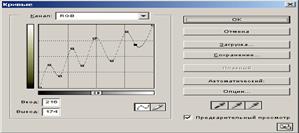
10. Image ► Adjustments ► Curves... (<Ctrl>+<M>)
11. Connect the layers: ► layer to the bottom One (<Ctrl>+<E>). 12. Image ► Adjustments ► Invert (<Ctrl>+ < I>) 13. 13. Image ► Rotate the Canvas ► 90° counterclockwise flip the image. 14. 14. Filter ► Stylize ► Wind... use the command.
15. 15. Image ► Rotate Canvas ► 90° counterclockwise
17. Program_files/ Photoshop/ Goodies/ Brushes / Assorted Brushes.install the handle by running the abr command.
Working of t ext effects Goal: to learn how to write text in different styles of Adobe Photoshop. Necessary tools and materials: PC, Adobe Photoshop. Content and order of work I. repetition of theoretical data; II. independent performance of exercises and analysis of results; III. delivery of laboratory work.
3. Тext
4. Use the move device to drag the record up.
| ||||||||||||||||||||||||||||||||||||||||||||||||||||||||||||||||||||||||||||||||||||||||||||
5. Connect the layers: ► layer to the bottom One (<Ctrl>+<E>). 5. Image ► Rotate Canvas ► 90° counterclockwise
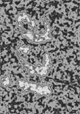
5. 5.Wind: Filter ► Stylize ► Wind... run the command 5 times.
6. Image ► Rotate Canvas ► 90o clockwise
8. Image ► Adjustments ► Invert (<Ctrl>+<I>).
9. Selection ► All (<Ctrl>+<A>) select the image and copy it to the clipboard. 10. Editing ► Copy (<Ctrl>+<C>). 11. press the < Delete> key from the keyboard. 12. go to the channel palette and create a new channel
13. switching to a new channel set the text in the buffer. 14. Editing ► Paste (<Ctrl>+<V>). 15. go to the RGB channel and return to the floors (<Ctrl>+<V>). 16. press the key combination <Ctrl>+<Alt>+<4>.
17. apply the selected area in red.
Exercise 2. To write the text, "Marsh inscription."
|
|||||||||||||||||||||||||||||||||||||||||||||||||||||||||||||||||||||||||||||||||||||||||||||
|
|
Последнее изменение этой страницы: 2021-04-12; просмотров: 118; Нарушение авторского права страницы; Мы поможем в написании вашей работы! infopedia.su Все материалы представленные на сайте исключительно с целью ознакомления читателями и не преследуют коммерческих целей или нарушение авторских прав. Обратная связь - 216.73.216.153 (0.006 с.) |
||||||||||||||||||||||||||||||||||||||||||||||||||||||||||||||||||||||||||||||||||||||||||||


 with the tools.
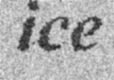
 record an ice record using the tool and set the parameter as follows:

 use the device to drag the record up.







 .
.