Заглавная страница Избранные статьи Случайная статья Познавательные статьи Новые добавления Обратная связь FAQ Написать работу КАТЕГОРИИ:  Археология Археология Биология Биология Генетика Генетика География География Информатика Информатика История История Логика Логика Маркетинг Маркетинг Математика Математика Менеджмент Менеджмент Механика Механика Педагогика Педагогика Религия Религия Социология Социология Технологии Технологии Физика Физика Философия Философия Финансы Финансы Химия Химия Экология ЭкологияТОП 10 на сайте Приготовление дезинфицирующих растворов различной концентрацииТехника нижней прямой подачи мяча. Франко-прусская война (причины и последствия) Организация работы процедурного кабинета Смысловое и механическое запоминание, их место и роль в усвоении знаний Коммуникативные барьеры и пути их преодоления Обработка изделий медицинского назначения многократного применения Образцы текста публицистического стиля Четыре типа изменения баланса Задачи с ответами для Всероссийской олимпиады по праву 
Мы поможем в написании ваших работ! ЗНАЕТЕ ЛИ ВЫ?
Влияние общества на человека
Приготовление дезинфицирующих растворов различной концентрации Практические работы по географии для 6 класса Организация работы процедурного кабинета Изменения в неживой природе осенью Уборка процедурного кабинета Сольфеджио. Все правила по сольфеджио Балочные системы. Определение реакций опор и моментов защемления |
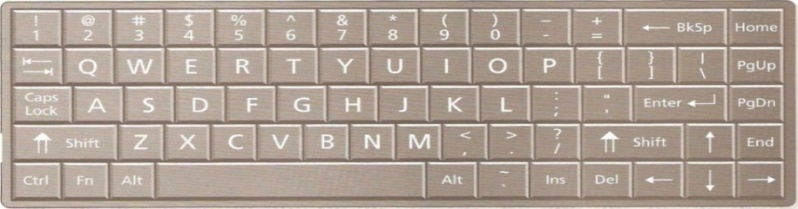
Look at the notebook keyboard below. Answer the questions.Содержание книги
Поиск на нашем сайте 1 Which key is between G and J? 2 Which key is to the left of Y?____________________ 3 Which key lets you type in capital letters? 4 Where are the arrow keys?_________________________ 5 Where is the multiplication sign?
2. Work in pairs. Choose a letter or key from the keyboard and describe where it is. Do not say which key you have chosen. Use next to, above, below, between, on the right/left/top/bottom.
3. Discuss these questions. 1 How often do you type letters or documents? 2 Which word-processing program do you use? 3 Which commands do you know? 4 How many different fonts does this question have? 5 Find the words in 1-3 that are in bold, in italics, underlined and highlighted.
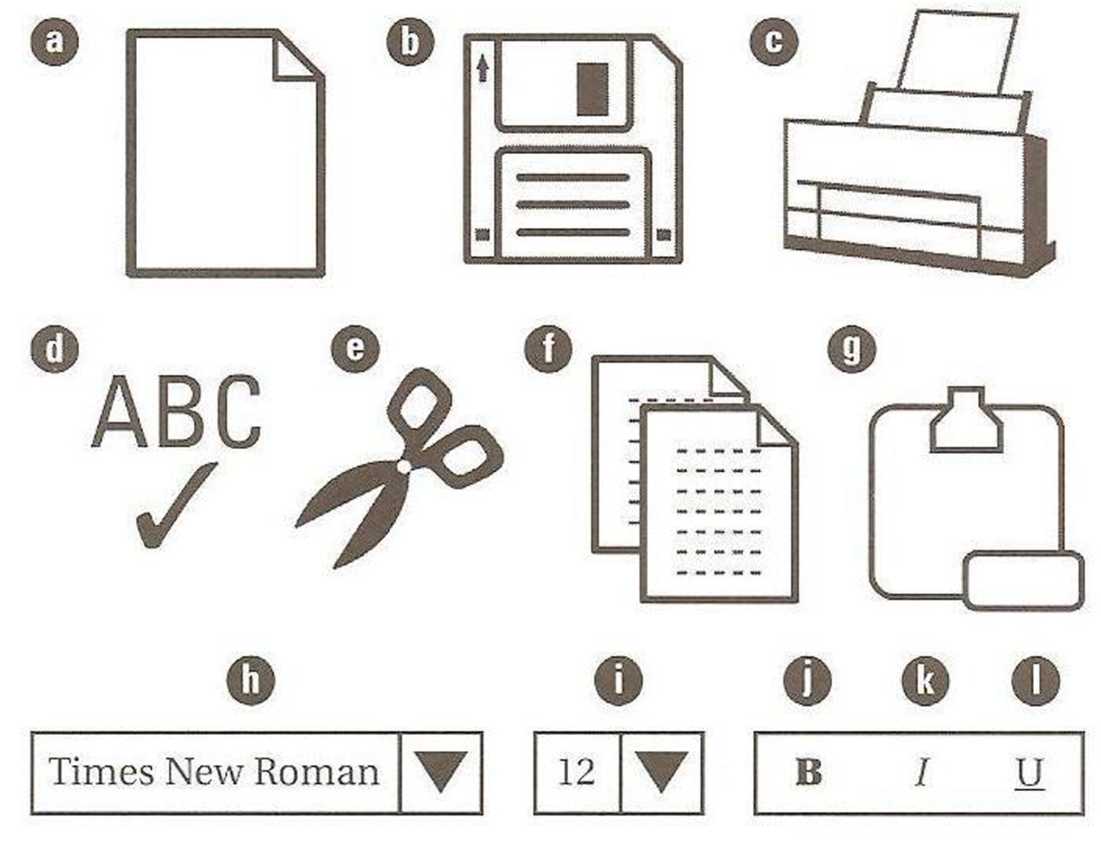
Reading 4. Look at the table of word-processing tools and commands and their functions. Then answer the questions. 1 Which tool checks your spelling? 2 Which edit command removes text or images? 3 Which format command changes the letter size?__ 4 Which file command opens a file or document? 5 6 Which view command shows the document as a printed page?___
5. Write the commands and tools from the table under the correct heading.
6. Match the first part of the sentence (1-6) with the second part (a-f). 1. Typing letters with a word processor 2. Many companies need people 3. I can learn a lot of new words 4. People usually type business letters 5. Check your spelling and grammar 6. If you cut a sentence out by mistake, a. in the Times New Roman font. b. c. before you print out your document. d. who can use a word processor. e. try clicking the undo button. f. is easier and quicker than writing by hand.
Vocabulary 7. Complete the sentences with words from the box. character ■ clipboard ■ fonts a format locations ■ menu bar ■ settings ■ toolbar 1. When you copy text, it stays on the_______________________________ until you want to paste it. 2. Change the paragraph______________________________ if you want bigger spaces between the lines. 3. Each word on the___________________________ contains a list of commands and tools. 4. Most of the icons on the______________________________ are also in words in the menu bar. 5. You can save a file in many different___________________________________ in your computer. 6. MS Word has about a hundred different for you to choose from. 7. A word processor lets you______________________________ a paragraph as well as the font. 8. If the you want is not on the keyboard, look in the Symbol command Speaking
|
|||||||||||||||||||||||||||||||||||||||||||
|
|
Последнее изменение этой страницы: 2017-02-10; просмотров: 1153; Нарушение авторского права страницы; Мы поможем в написании вашей работы! infopedia.su Все материалы представленные на сайте исключительно с целью ознакомления читателями и не преследуют коммерческих целей или нарушение авторских прав. Обратная связь - 216.73.217.64 (0.006 с.) |