
Мы поможем в написании ваших работ!
ЗНАЕТЕ ЛИ ВЫ?
|
Table 9-13 Tools for Fixing Printer Problems
Содержание книги
- Table 1-4 Major CMOS/BIOS Settings
- Table 1-5 Motherboard Form Factors
- Adapter Cards and Integrated Ports
- Daughter Boards and Riser Boards
- Installing SATA, PATA, and SCSI drives
- Table 1-10 typical PATA settings on systems with two PATA host adapters and two drives
- Table 1-12 Power Fluctuations
- Table 2-2 EIA-568-A Wire Pairs and Pins
- Public, Private, and APIPA IP Addresses
- Static and Dynamic IP Addresses
- Table 2-6 Ports and Protocols
- Installing and Configuring a SOHO Router
- Table 2-9 Common DSL Services Compared
- Line-of-Sight Wireless Internet Service
- Install and Configure Laptop Hardware and
- Other Laptop Display Components
- Docking Station Versus Port Replicator
- Table 4-1 Laser-Printing Process
- Printer Installation and Connections
- Lifting and Moving Equipment Safely
- Communication and Professionalism
- Windows XP, Windows Vista, and Windows
- UAC and the Administrator Account
- Table 6-5 Command-Line Tools for Networking
- Features and Tools Usage How to Run
- Control Panel Options Unique to Windows 7
- Table 6-12 Network Settings by Windows Version
- Table 6-14 Recommended Preventive Maintenance Tasks in Windows
- Virtualization Resource Requirements
- Security Best Practices for Workstation Security
- Data Destruction and Disposal Methods
- Table 7-4 Securing a SOHO Wired Network
- Getting Applications for Your Device
- Mobile Network Connectivity and Email
- Laptop and Tablets: How They’re Different
- Gather Data from the Customer
- Table 9-2 Motherboard, RAM, CPU, and Power Symptoms, Causes, Solutions
- Troubleshooting Video and Display Issues
- Table 9-6 Troubleshooting Tools for Wired and Wireless Networks
- Table 9-9 Operating Systems Symptoms, Problems, and Solutions
- Troubleshooting Security Issues
- Troubleshooting Laptop Issues
- Table 9-13 Tools for Fixing Printer Problems
- CMOS (complementary metal-oxide semiconduc-tor), 11-15, 94
- Digital access, prevention methods, 136-140
- FORMAT command-line tool, 112
- ISPs (Internet service pro-viders), 44
- NSLOOKUP command-line tool, 112
- Preventive maintenance, Windows, 127
- System protection setting (Control Panel), 119

| Tool
| How Used
| |
|
| | Maintenance kit
| Replacement fuser, air filters, transfer rollers, and other components for
| |
| laser printers; extends printer’s useful life.
| |
|
| | Toner vacuum
| Removes toner particles from laser printer. Toner particles are so small
| |
| they can’t be captured by conventional vacuum cleaners.
| |
|
| | Compressed air
| Blows dust, dirt, and toner particles out of printers and all-in-one units.
| |
|
| | Printer spooler
| Windows feature that captures print jobs and sends them to the printer
| |
| when the printer is ready.
| |
|
|
Use Table 9-14 to look up typical printer symptoms, problems, and their solutions.
|
|
| Chapter 9: Troubleshooting 201
| |
|
| | Table 9-14 Printer Symptoms, Problems, and Solutions
|
| |
|
|
|
| | Symptom
| Possible Cause
| Items to Check
| Typical Solution
| |
|
|
|
| | Streaks or
| Laser: Low toner
| Toner cartridge.
| Shake toner cartridge. If
| | smearing
|
|
| problem recurs, replace
| |
|
|
| toner cartridge.
| |
|
|
|
| |
| Inkjet: Dirty print
| Print heads or roll-
| Use damp cleaning
| |
| heads or rollers
| ers.
| sheet to clean these
| |
|
|
| components.
| |
|
|
|
| |
| Inkjet: Head gap too
| Head gap.
| Adjust the head gap.
| |
| narrow when printing
|
|
| |
| on heavy paper or
|
|
| |
| card stock
|
|
| |
|
|
|
| |
| Inkjet: Wrong paper
| Paper type setting in
| Select the correct paper
| |
| type setting for paper
| printer driver.
| type setting for paper or
| |
| or media in use (see
|
| media in use.
| |
| Figure 9-10)
|
|
| |
|
|
|
| |
| Thermal: Poor quality
| Check the coating
| Replace the media.
| |
| media
| on the media.
|
| |
|
|
|
| |
| Thermal: dirty heat-
| Heating element.
| Clean the heating ele-
| |
| ing element
|
| ment.
| |
|
|
|
| |
| Thermal: Print head
| Check the printer
| Adjust the print head
| |
| energy set incorrectly
| driver setting.
| energy settings per ven-
| |
|
|
| dor recommendations
| |
|
|
| for bar code media.
| |
|
|
|
| |
| Thermal: Print speed
| Check the print
| Reduce the print speed
| |
| too high
| speed setting.
| for the bar code media.
| |
|
|
|
| |
| Thermal: Using
| Check the orienta-
| Change to a different
| |
| a 90-degree or
| tion.
| orientation for the bar
| |
| 270-degree orienta-
|
| code printing.
| |
| tion
|
|
| |
|
|
|
| |
| Impact: Dried-out
| Check the ribbon.
| If the ribbon has an
| |
| ribbon
|
| auxiliary ink reservoir,
| |
|
|
| activate it.
|
Replace the ribbon when dried out.

202 CompTIA A+ Quick Reference

Table 9-14 Continued

| Symptom
| Possible Cause
| Items to Check
| Typical Solution
| |
|
|
|
| | Faded prints
| Laser: Toner saving
| Check the print
| Use Normal print
| |
| setting
| quality setting in the
| modes.
| |
|
| printer driver.
|
| |
|
|
|
| |
| Color laser: Toner
| Check toner levels.
| Replace toner levels if
| |
| levels low or toner
| Check the toner belt.
| low.
| |
| belt problems
|
| |
|
| Clean or replace the
| |
|
|
| |
|
|
| toner belt.
| |
|
|
|
| |
| Inkjet: Some print
| Print nozzle check.
| Clean the print head.
| |
| nozzles clogged
|
|
| |
|
|
|
| |
| Inkjet: One or more
| Check ink levels.
| Replace ink as needed.
| |
| colors out of ink
|
|
| |
|
|
|
| |
| Thermal: Ribbon
| Check the ribbon
| Reinstall ribbon cor-
| |
| installed backward
| installation.
| rectly.
| |
|
|
|
| |
| Thermal: Ribbon
| Check ribbon
| Replace the ribbon with
| |
| incompatible with
| compatibility with
| the correct ribbon for
| |
| media
| media.
| the media.
| |
|
|
|
| |
| Impact: Ribbon dried
| Check the ribbon.
| If the ribbon is dried
| |
| out
|
| out, replace.
| |
|
|
|
| |
| Impact: Heat gap
| Check the head gap.
| If print is more faded
| |
| wrong
|
| on top, the head gap is
| |
|
|
| incorrect.
| |
|
|
| Reset the head gap.
| |
|
|
|
| | Ghost images
| Laser: Toner car-
| Examine the printed
| Distance between top of
| |
| tridge, imaging drum
| page.
| page and ghost image
| |
| wiper blade, or fuser
|
| indicates problem area;
| |
| problems
|
| see printer’s service
| |
|
|
| manual.
| |
|
|
|
| | Toner not
| Laser: Fuser problems
| Check the fusing
| Repair or replace.
| | fused to the
|
| unit.
|
| | paper
|
|
|
| 
Creased paper Incorrect alignment of Compare the paper
paper guides guide width to the
actual paper width.
Adjust the paper guide to match the actual paper width.
Chapter 9: Troubleshooting 203
 
| Symptom
| Possible Cause
| Items to Check
| Typical Solution
| |
|
|
|
| | Paper not
| Single-sheet printers:
| Check number of
| Reduce the number of
| | feeding
| Paper pickup prob-
| sheets in paper feed.
| sheets in the paper feed
| |
| lems
| Paper positioning in
| tray.
| |
|
|
| |
|
| feed tray.
| Remove, fan, and rein-
| |
|
| Paper jams.
| sert the paper.
| |
|
|
| |
|
|
| If the problem persists,
| |
|
|
| replace the pickup roll-
| |
|
|
| ers.
| |
|
|
|
| |
| Continuous-feed
| Check tractor-feed
| Adjust so that the
| |
| printers: Tractor-feed
| tension.
| paper moves freely and
| |
| tension may be off
|
| doesn’t tear loose from
| |
|
|
| the tractor-feed pins.
| |
|
|
|
| | Paper jam
| Paper path has too
| Check for alternative
| Use straight-through
| |
| many turns for thick
| paper paths.
| paper path for envelopes
| |
| media
|
| and card stock when
| |
|
|
| available.
| |
|
|
|
| |
| Paper feed tray over-
| Check recommended
| Don’t overfill the paper
| |
| loaded
| number of sheets in
| feed tray.
| |
|
| the paper feed.
|
| |
|
|
|
| |
| Creased paper
| Check the paper
| Don’t use creased or
| |
|
| guide settings.
| torn paper or media.
| |
|
|
|
| |
| Damaged or damp
| Check how paper is
| Don’t use damaged or
| |
| paper
| stored.
| damp paper.
| |
|
|
|
| | No connec-
| Network printer: Loss
| Check the network.
| Check printer and com-
| | tivity
| of connection to net-
| connection
| puter connections to the
| |
| work
|
| network.
| |
|
|
|
| |
| Local printer or
| Check the cable.
| Check both ends of
| |
| shared printer: Loss
|
| printer cable.
| |
| of connection to com-
|
| Check hub if hub used
| |
| puter
|
| |
|
| between printer and
| |
|
|
| |
|
|
| computer.
| |
|
|
|
|
204 CompTIA A+ Quick Reference
Table 9-14 Continued
| Symptom
| Possible Cause
| Items to Check
| Typical Solution
| | |
|
|
|
| | | Garbled
| Incorrect or damaged
| Check the printer
| Install the correct print-
| | | characters on
| printer driver
| driver.
| er driver.
| | | paper
|
|
|
| | | Cable damage
| Check the cable to
| Replace the cable if
| | |
| | |
|
| printer.
| defective.
| | |
|
|
|
| | |
| Port defect
| Check for other suit-
| Connect the printer to
| | |
|
| able port on host PC.
| another port and retry.
| | |
|
|
|
| | |
| Printer failure
| Try self-test.
| If the printer fails self-
| | |
|
|
| test, replace printer.
| | |
|
|
|
| | | Vertical lines
| Laser: Toner car-
| Check the toner
| Clean or replace com-
| | | on page
| tridge/drum problems
| cartridge, drum, or
| ponents as needed.
| | |
| or dirty rollers
| rollers.
| Check the printer manu-
| | |
|
|
| | |
|
|
| al for help in determin-
| | |
|
|
| ing most likely cause
| | |
|
|
| based on marks.
| | |
|
|
|
| | |
| Inkjet: Ink on feed
| Check the feed roll-
| Clean the feed rollers.
| | |
| rollers
| ers.
|
| | |
|
|
|
| | |
| Thermal: heating ele-
| Check the heating
| Clean or replace the
| | |
| ment problems
| element.
| heating element.
| | |
|
|
|
| | | Angled
| Thermal: Creased
| Check the ribbon-
| Adjust as needed to
| | | streaks on
| ribbon
| feed mechanism.
| remove creases in the
| | | page
|
|
| ribbon.
| | |
|
|
|
| | | Backed-up
| Printer in offline
| Check the print
| After printer is online,
| | | print queue
| mode (turned off,
| queue.
| release the print jobs.
| | |
| paper jam, set offline,
|
|
| | |
| connection problem)
|
|
| | |
|
|
|
| | | Low memory
| Laser: Too much
| Check the printer
| Reduce the graphics
| | | errors
| data on page to fit in
| memory size and
| resolution of the print
| | |
| printer memory
| compression set-
| job.
| | |
|
| tings.
| Add memory to the
| | |
|
|
| | |
|
|
| printer.
| | |
|
|
|
| | | Access denied
| Account not pro-
| Check user account
| Add printer access to
| | |
| vided access to shared
| settings.
| the user account.
| | |
| printer
|
|
| | |
|
|
|
| |
Chapter 9: Troubleshooting 205
| Symptom
| Possible Cause
| Items to Check
| Typical Solution
| | |
|
|
|
| | | Printer will
| Laser: Toner prob-
| Check the toner car-
| New cartridge: Make
| | | not print
| lems
| tridge.
| sure that tape was
| | |
|
|
| removed from the toner.
| | |
|
|
| Cartridge already in
| | |
|
|
| use: Replace.
| | |
|
|
|
| | |
| Printer has restric-
| Check printer prop-
| Print jobs go to printer
| | |
| tions on hours of use
| erties Advanced tab.
| when released.
| | |
|
|
|
| | |
| Printer offline
| Check the printer
| Put printer online and
| | |
|
| status.
| release print jobs from
| | |
|
|
| spooler.
| | |
|
|
|
| | |
| Wrong port specified
| Check the printer
| Select the correct printer
| | |
| for printer
| port.
| port.
| | |
|
|
|
| | | Color prints
| Color laser: Low or
| Check the toner car-
| Replace empty toner
| | | in wrong print
| empty color toner
| tridges.
| cartridges.
| | | color
|
|
|
| | | Inkjet: Clogged print
| Run the nozzle
| If the print head or
| | |
| | |
| head
| check utility.
| nozzles clogged, clean
| | |
|
|
| print head.
| | |
|
|
|
| | | Unable to
| Install program needs
| Check the access
| Rerun the installation
| | | install printer
| to run with elevated
| level needed.
| program in elevated
| | |
| (administrator) access
|
| mode.
| | |
|
|
| Provide the administra-
| | |
|
|
| tor password or click
| | |
|
|
| through in Vista/7 as
| | |
|
|
| prompted.
| | |
|
|
|
| | | Error codes
| Indicates problem
| Look up the error
| Selected error codes for
| | |
| with printer
| code.
| HP LaserJet:
| | |
|
|
| 13 or 13.xx Paper jam
| | |
|
|
| 20 Insufficient memory
| | |
|
|
| 49.xx Firmware error
| | |
|
|
| 53.xy.zz DIMM mem-
| | |
|
|
| ory error in specified
| | |
|
|
| module
| | |
|
|
| 59.x Main motor prob-
| | |
|
|
| lems
| | |
|
|
| 66.xx.yy External paper
| | |
|
|
| handling device error
| | |
|
|
|
| |
206 CompTIA A+ Quick Reference
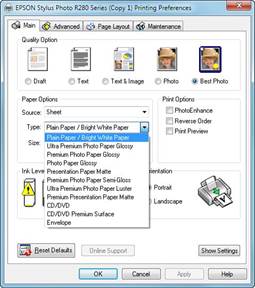
Figure 9-10 Selecting the correct paper type.
 Index Index
A
|
 Археология
 Биология
 Генетика
 География
 Информатика
 История
 Логика
 Маркетинг
 Математика
 Менеджмент
 Механика
 Педагогика
 Религия
 Социология
 Технологии
 Физика
 Философия
 Финансы
 Химия
Химия Экология